A strong paving company website should help a property owner, facility manager, general contractor, developer, or public buyer answer four questions quickly: does this company perform the work I need, has it completed comparable projects, does it serve my location, and what information should I provide to request an estimate or bid? The best paving company website design examples combine clear service paths, credible project proof, practical maintenance guidance, and simple ways to start a qualified conversation.
The ten examples below show how asphalt paving contractors and pavement companies can organize their websites around real purchasing decisions—from commercial parking lots and roadway work to repairs, sealcoating, striping, accessibility considerations, maintenance planning, and bilingual customer support. Each concept is designed to make technical capabilities easier to understand while turning relevant traffic into stronger project opportunities.
Paving company website design examples: quick overview
- Project-focused positioning: Establish the type, scale, and geography of work with a clear hero and direct estimate action.
- Audience pathways: Separate commercial, municipal, multifamily, industrial, construction-partner, and residential journeys.
- Service selection: Help visitors distinguish new paving, repair, milling and overlay, sealcoating, and striping needs.
- Project case studies: Show surface condition, scope, phasing, finished work, and measurable project context.
- Service-area clarity: Explain where crews work and connect local markets to relevant capabilities.
- Estimate and bid intake: Collect site, scope, schedule, plans, and procurement information without creating unnecessary friction.
- Maintenance planning: Help property teams understand inspections, priorities, treatment options, and ongoing care.
- Material guidance: Explain how asphalt, concrete, repair, resurfacing, and reconstruction decisions are evaluated.
- Striping and accessibility: Present markings, traffic flow, accessible parking, and compliance coordination responsibly.
- Bilingual customer experience: Provide complete English and Spanish journeys from discovery through estimate follow-up.
What a high-performing paving company website needs
Paving buyers do not all begin with the same terminology or level of project information. A property manager may need a phased parking-lot plan, a general contractor may be assembling subcontractor pricing, and a homeowner may only know that a driveway is cracked or failing. A high-performing paving website helps each visitor recognize the right path without forcing every audience through one generic service page.
| Website element | What it should accomplish |
|---|---|
| Clear market and service positioning | Identify the work performed, customer types served, typical project environments, and geographic coverage. |
| Relevant project proof | Connect before-and-after visuals, project scope, site conditions, phasing, and finished results to specific services. |
| Useful service guidance | Help visitors understand the difference between repair, preservation, resurfacing, reconstruction, striping, and related work. |
| Qualified estimate intake | Collect the location, property type, concern, scope, timing, plans, and preferred contact details needed for useful follow-up. |
| Local visibility | Build useful market pages around real service coverage, relevant work, local questions, and clear next steps. |
| Trust and operational clarity | Explain the team, safety approach, communication, scheduling, site coordination, and verifiable credentials. |
Strong equipment imagery can earn attention, but a focused website design strategy is what connects customer intent, technical capability, local relevance, project proof, and follow-up into one conversion-focused experience.
1. Lead with the work, market, and next step
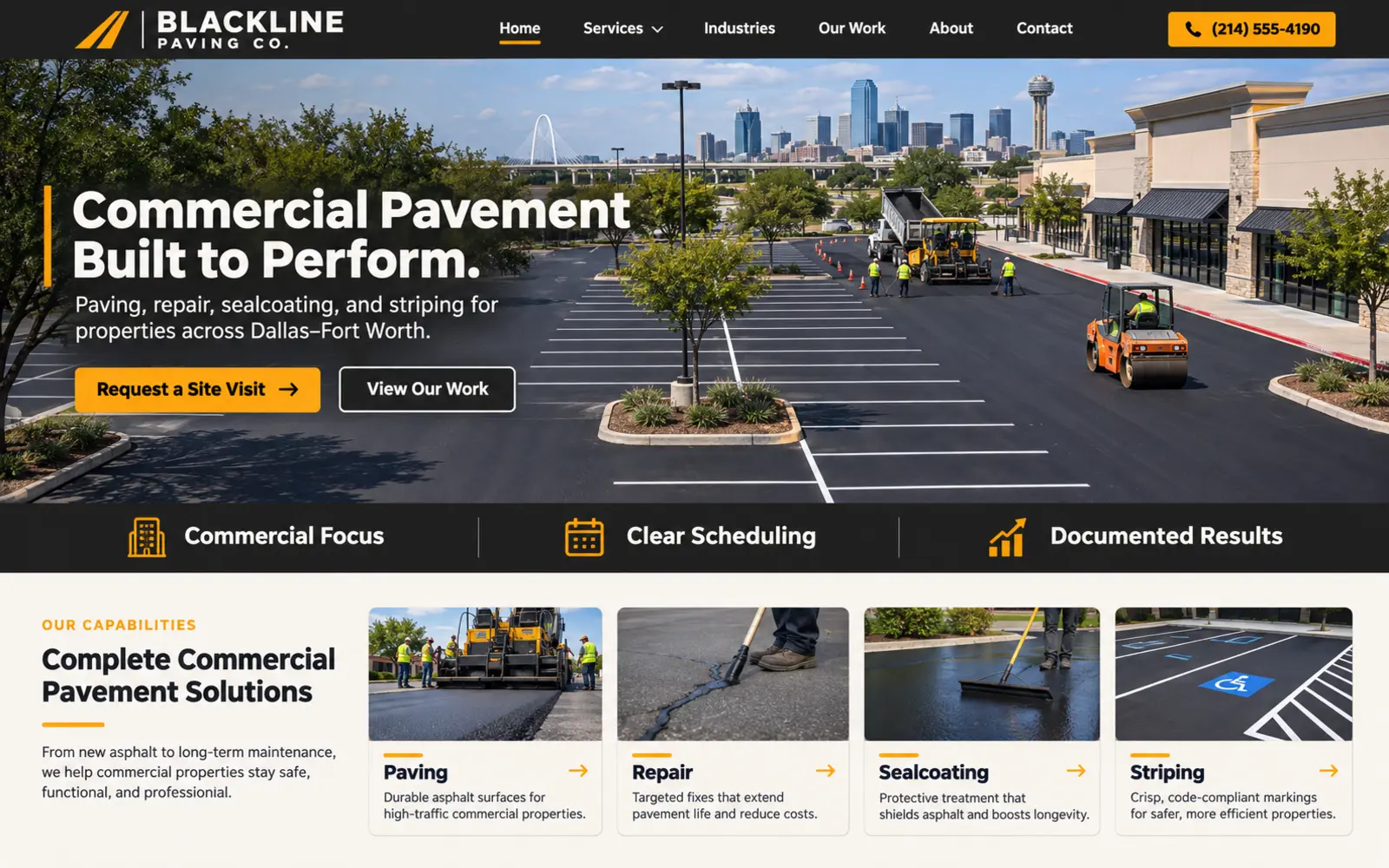
A paving company's opening screen should communicate more than heavy equipment on blacktop. This design uses a wide project visual, a direct value proposition, a defined service region, and two useful actions: request an estimate and explore completed projects. Within seconds, a visitor can understand whether the company focuses on commercial parking lots, roadways, industrial sites, multifamily properties, residential driveways, or a combination of markets.
The hero should reflect the projects the company wants to win. A commercial contractor might show an active parking-lot installation with organized traffic control and a polished final result. A roadway contractor may feature milling, placement, compaction, or a completed municipal corridor. A residential paving company can use a well-framed driveway project and a simpler estimate path.
Replace broad statements such as “quality you can trust” with positioning that helps qualify the opportunity. “Commercial asphalt paving and maintenance across Dallas–Fort Worth” communicates the service, market, and location immediately. Support that message with verifiable experience, relevant project examples, and a clear next step. Optimize large photography or video carefully so visual impact does not slow the first impression.
2. Separate customer and procurement pathways
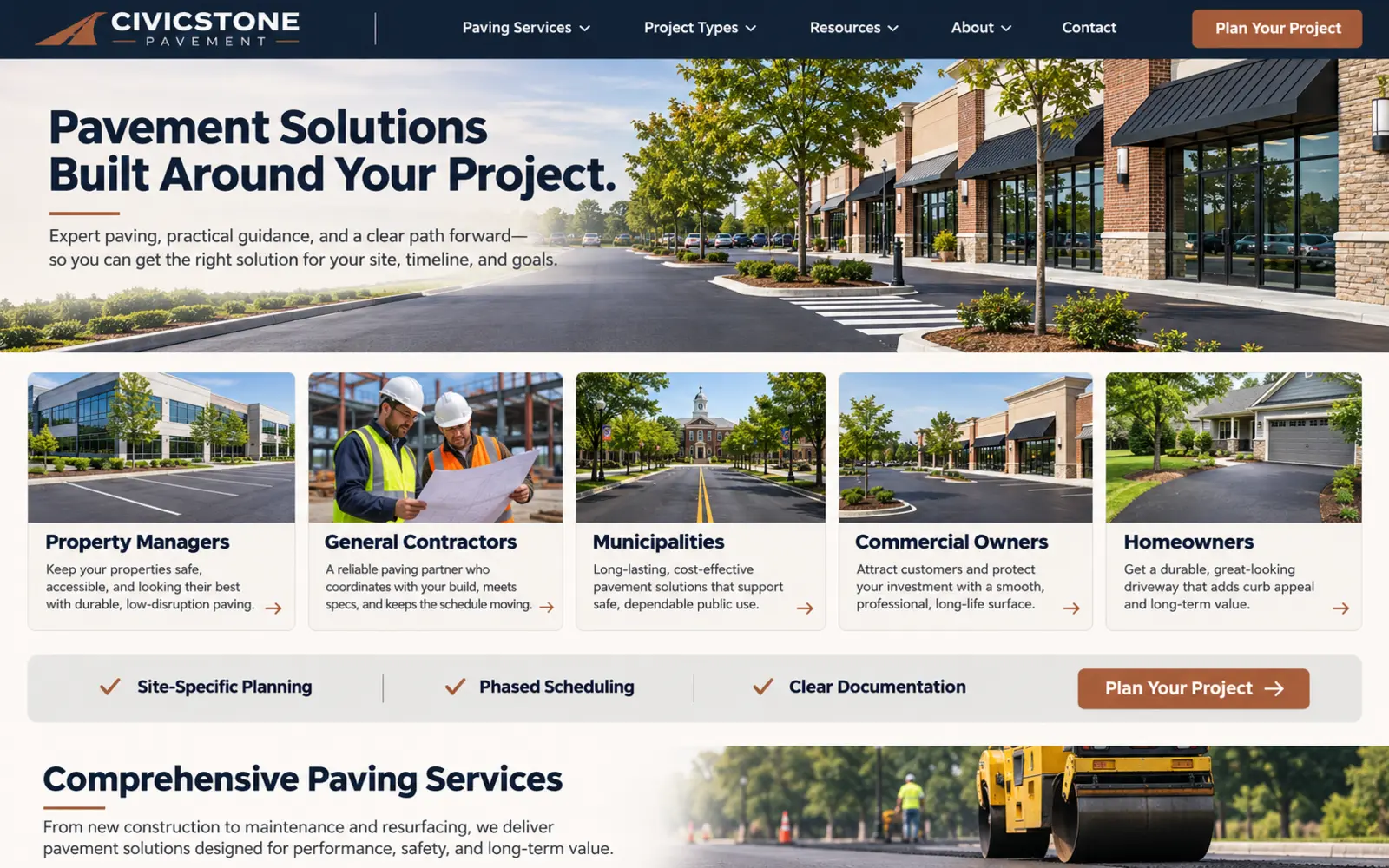
A property manager planning around tenants has different concerns from a general contractor requesting subcontractor pricing or a homeowner comparing driveway options. This design opens with audience pathways for commercial owners, property and facility managers, general contractors and developers, municipalities and institutions, and residential customers when offered.
Each path should answer audience-specific questions. Property teams may need phased scheduling, traffic access, maintenance planning, and communication across multiple sites. General contractors may look for bid instructions, capability statements, coverage, safety documentation, and a reliable estimating contact. Public buyers may need procurement information and qualifications. Residential customers usually need clear service boundaries, a simple inspection request, and realistic expectations about the estimating process.
Keep the journeys connected to one operating system. Audience landing pages can route forms, assign follow-up, and measure the sources of qualified opportunities, but the language should remain consistent across the website, advertising, proposals, and sales process. Do not create a market page unless the company can genuinely support that audience.
3. Build a problem-and-service selector
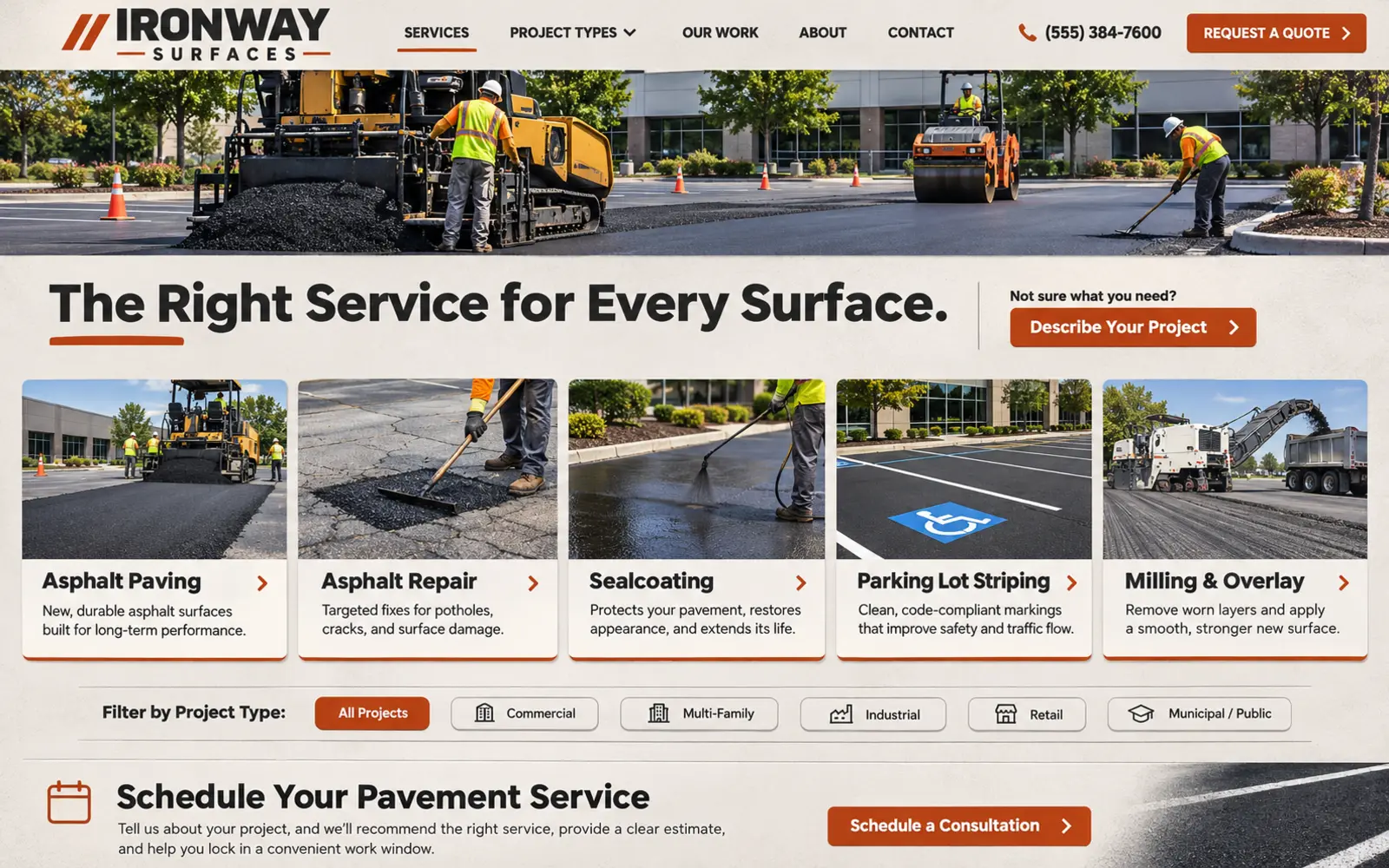
Many visitors recognize potholes, cracking, standing water, faded markings, uneven transitions, or a deteriorated surface but do not know which treatment is appropriate. This design lets the visitor begin with either a visible concern or a service: new asphalt paving, patching and repair, crack treatment, milling and overlay, sealcoating or surface treatment, striping, concrete flatwork, drainage-related coordination, and full reconstruction when offered.
Every service page should explain the problem it addresses, the typical evaluation process, related services, project environments, and the next step. Use plain language first, then introduce technical terms where they help the buyer communicate with an estimator. Avoid using “repair,” “resurfacing,” and “replacement” as interchangeable labels; the website should make clear that the right recommendation depends on site conditions and professional evaluation.
The selector should guide rather than diagnose. Photos and short descriptions can help visitors identify a concern, but the website should not promise that a surface needs only a specific treatment without an inspection. A final prompt such as “Not sure what the site needs? Request an assessment” creates a low-friction path for buyers who are still defining the scope.
4. Turn the project gallery into evidence
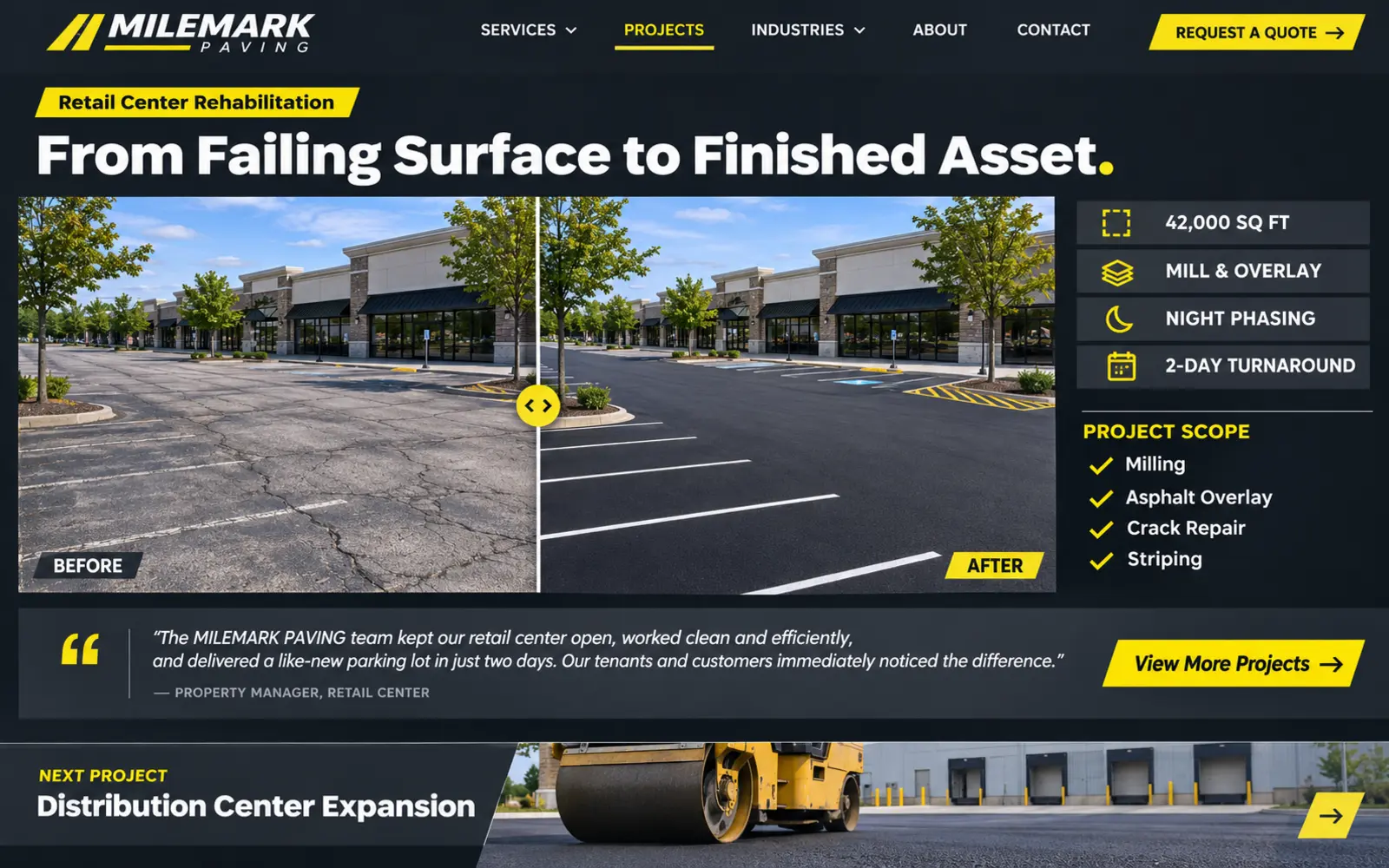
A gallery of trucks and finished pavement can look impressive without helping a buyer evaluate relevant experience. This design presents each project as a concise case study with the property type, location or market, original condition, project objectives, services performed, coordination requirements, phasing, and finished result.
Useful visual sequences may show the original distress, preparation, milling or removal, base or repair work, paving, compaction, markings, and final traffic pattern. For a parking-lot project, explain how access, tenants, deliveries, weather, or operating hours shaped the schedule when appropriate. For roadway or institutional work, include only information that can be shared publicly and accurately.
Organize case studies by service, market, and geography so a visitor can quickly find comparable work. Use authentic project photography whenever the page presents work as completed by the company. Captions and alt text should describe what is visible, while compressed responsive images protect page speed. Strong case studies give estimators and sales teams useful proof to reference after the website inquiry.
5. Make service coverage and crew reach clear
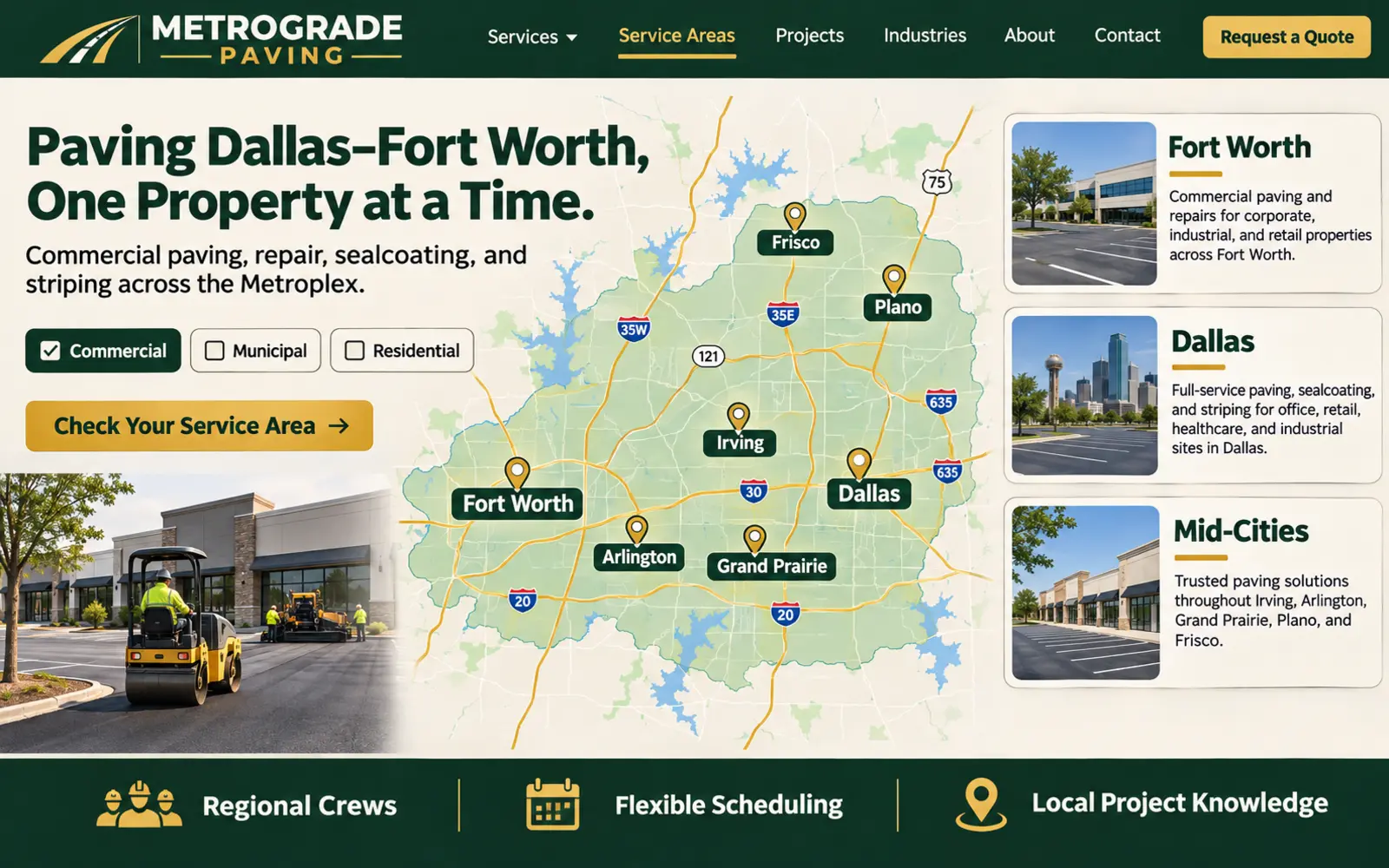
Paving projects are location dependent. Mobilization, crew scheduling, material availability, site access, traffic conditions, and project size can affect whether an opportunity fits the operation. This design combines a clear Dallas–Fort Worth service map with useful market pages, recent project examples, relevant services, and a direct way to ask whether a site is within coverage.
A credible service-area page should provide more than a city name repeated through generic text. It can explain the property types served in that market, nearby completed work, common services, operational coverage, and the information needed for an estimate. Regional pages should remain accurate as service boundaries change.
For companies with wider commercial reach, separate the core service area from project-based travel. A statement such as “Routine service throughout DFW; larger commercial opportunities evaluated across Texas” is more useful than claiming nationwide coverage without context. Connect location pages to the correct estimator or office and track which markets produce qualified inquiries.
6. Create a smarter estimate and bid intake
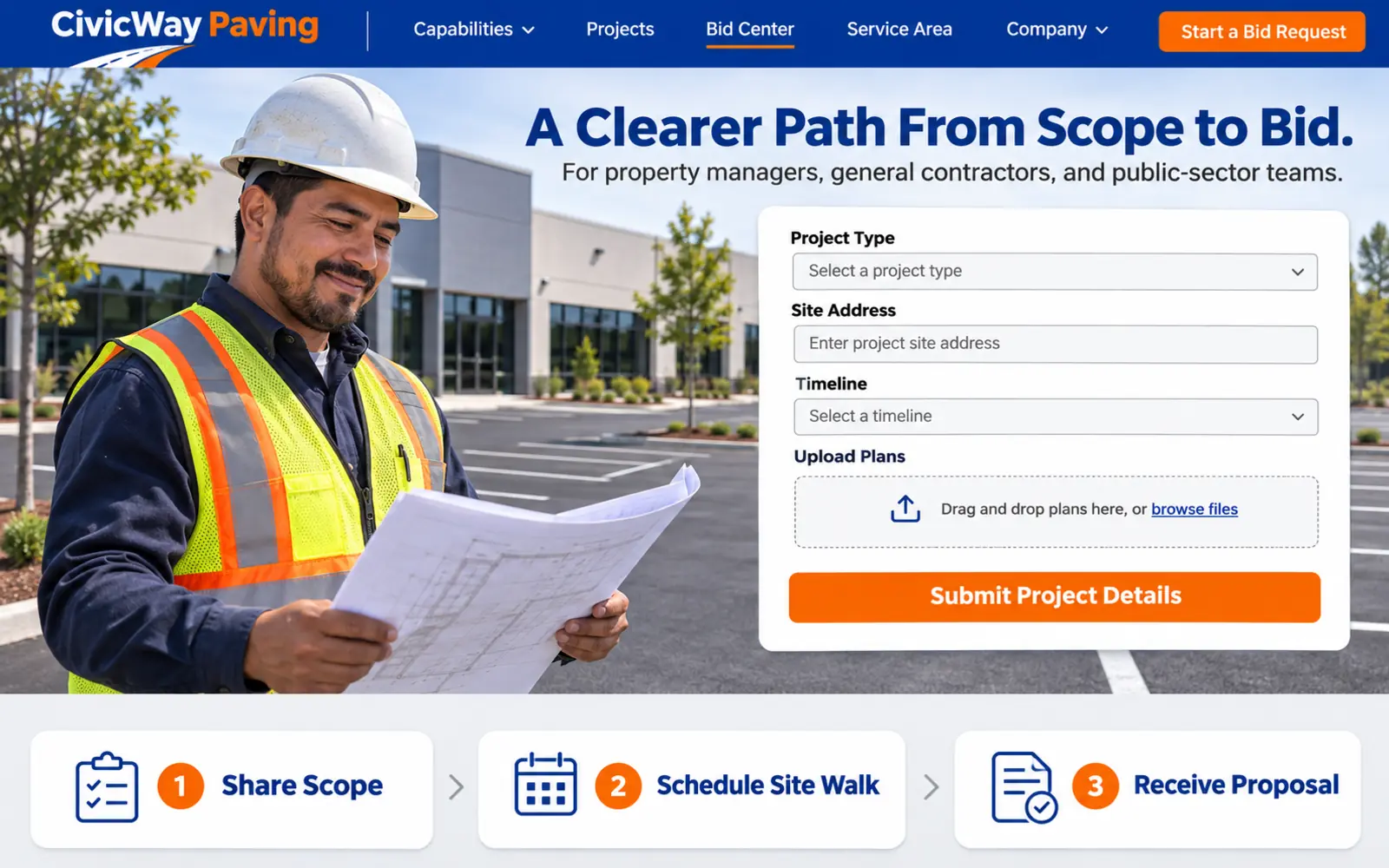
“Name, email, message” rarely gives an estimator enough context to prioritize or route a paving opportunity. This design creates a guided intake for the site address, property or project type, customer role, visible concern or requested service, approximate area when known, desired schedule, access limitations, procurement stage, and preferred contact method.
Commercial and construction inquiries can include optional uploads for plans, bid invitations, scope documents, site photos, surveys, or specifications. Residential and early-stage customers should not be required to answer technical questions they may not understand. Use conditional fields so the form becomes more detailed only when the selected project type requires it.
Set expectations after submission. Explain whether the next step is a phone conversation, document review, site visit, formal bid invitation, or scheduled assessment. Send a clear confirmation, route the inquiry to the right person, and preserve the source and selected service in the CRM. The goal is not the longest form; it is enough relevant information to produce a useful response.
7. Present pavement maintenance as a planned program
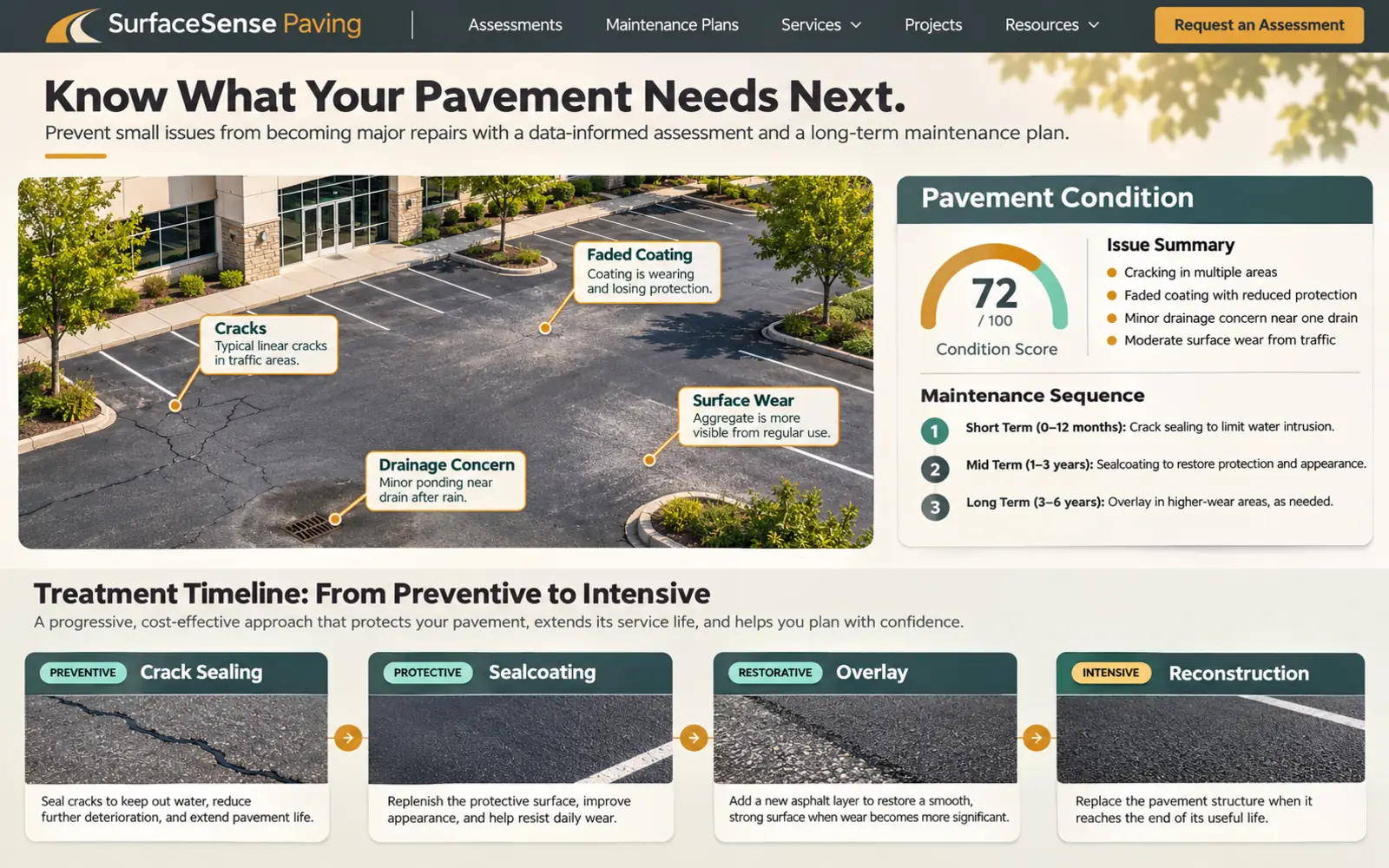
Property teams often need to plan work across one large site or a portfolio of locations. This design presents pavement maintenance as a repeatable program: assess current conditions, document priority areas, distinguish immediate repairs from preservation opportunities, plan phasing, coordinate striping, and review the site over time.
A maintenance page can explain common categories such as crack treatment, localized repairs, pothole repair, surface treatments, sealcoating where appropriate, striping refreshes, drainage observations, milling and overlay, and reconstruction. It should also make clear that treatment selection depends on pavement condition, structure, traffic, drainage, climate, use, and professional evaluation.
Give facility managers a practical way to request a portfolio review, upload site lists, or discuss annual planning. Use timelines only as general planning aids, not universal promises. A useful website helps customers ask better questions and understand priorities while leaving engineering, specifications, and final recommendations to the appropriate qualified parties.
8. Explain asphalt, concrete, repair, and resurfacing choices
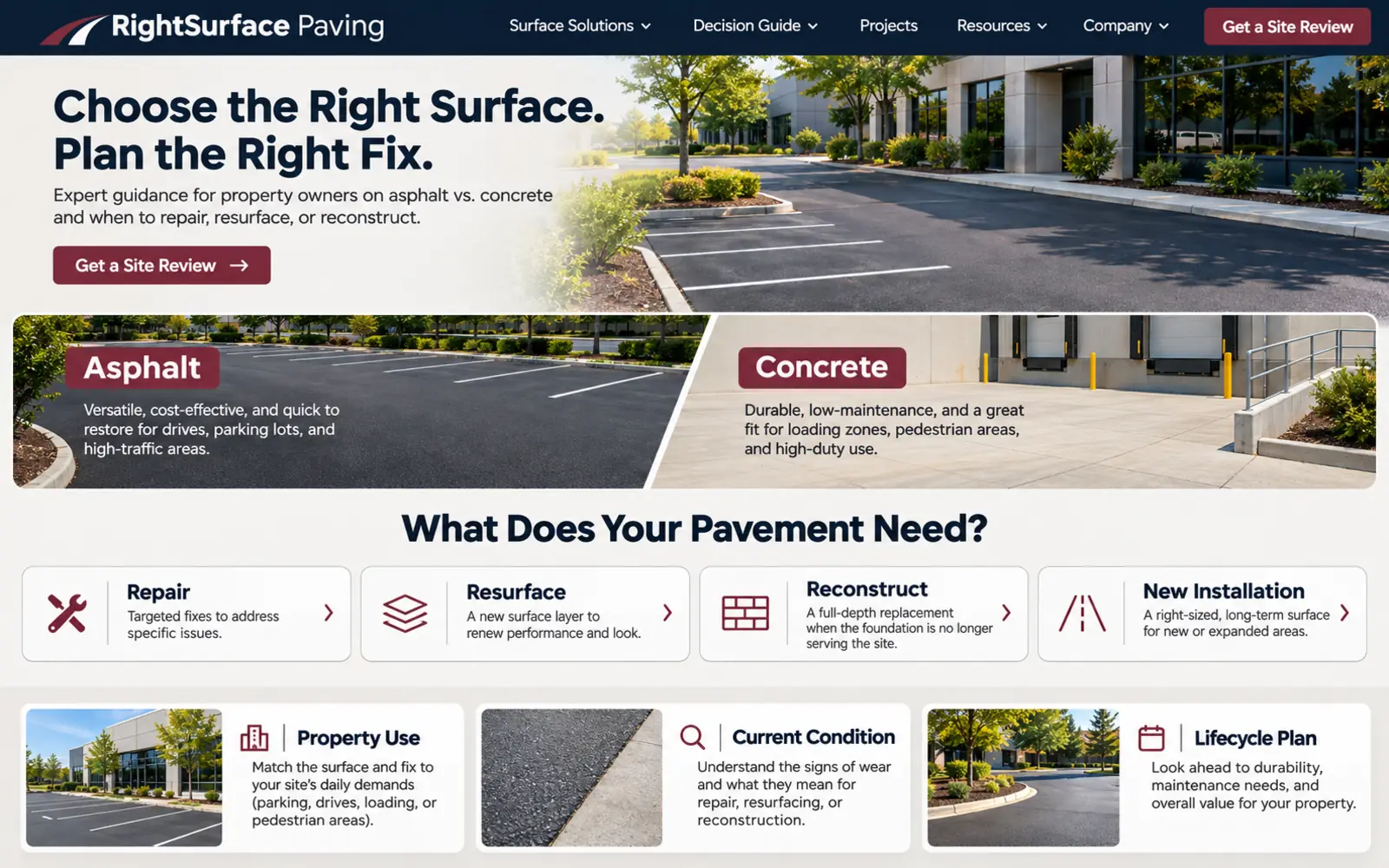
Buyers frequently search for questions such as asphalt versus concrete, repair versus replacement, or sealcoat versus overlay. This design turns those searches into an educational comparison organized around use, current condition, traffic, drainage, base conditions, interruptions, appearance, maintenance expectations, and project objectives.
A comparison page should not declare one material or treatment universally better. Asphalt may fit one site or project phase, while concrete may be appropriate for another area, loading condition, detail, or ownership goal. A repair can address a localized failure, while broader deterioration may require a different approach. Explain how an estimator or project team gathers information before recommending a scope.
Use diagrams, photos, and frequently asked questions to clarify terminology, then link to relevant service pages and an assessment request. Avoid precise lifespan, performance, or cost claims unless they are supported, properly qualified, and consistent with the company's actual work. Helpful guidance builds trust when it shows how decisions are evaluated rather than oversimplifying them.
9. Connect striping, traffic flow, and accessibility responsibly
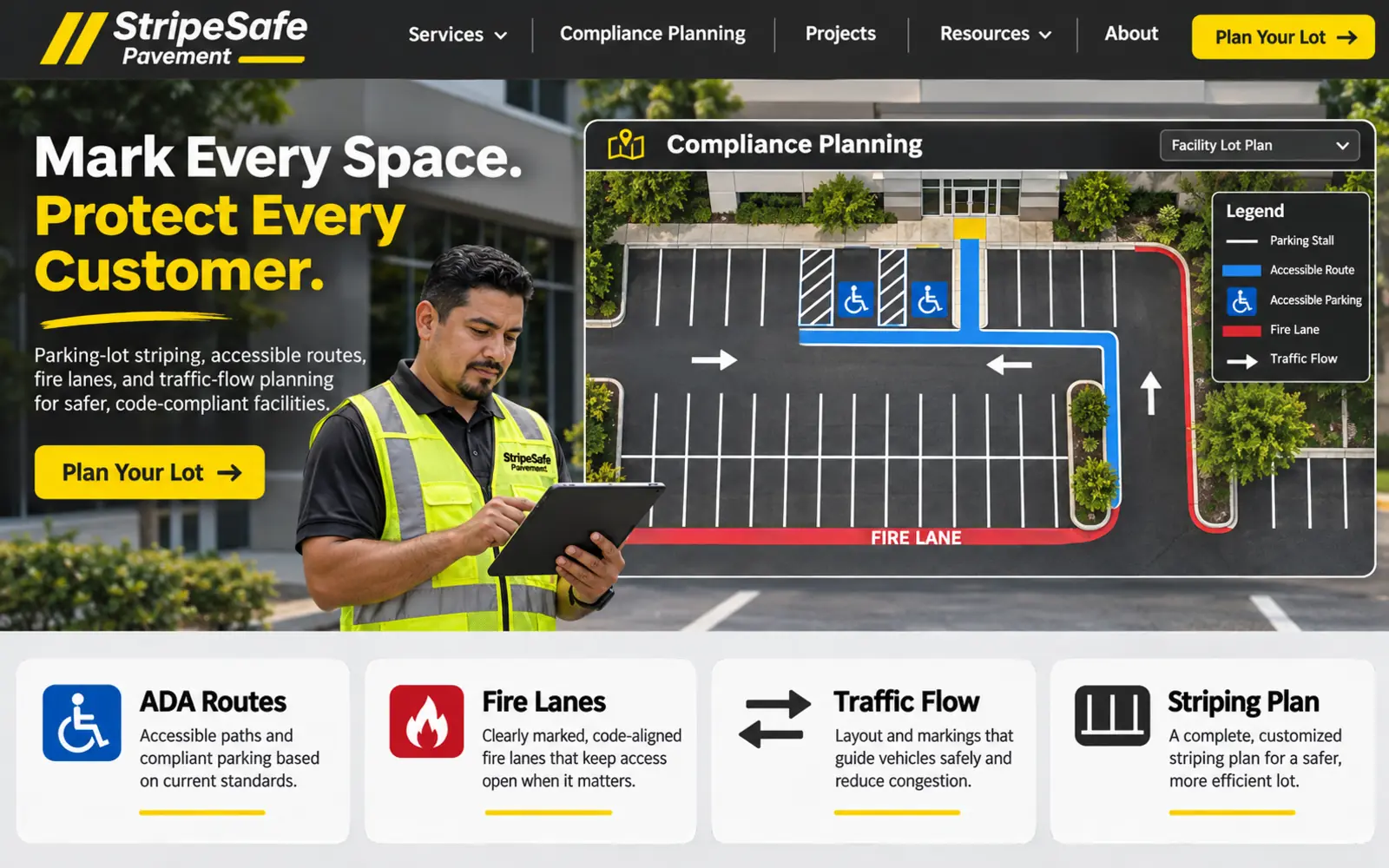
Striping is often the most visible part of a completed parking area, but the website should present it as more than fresh paint. This design explains parking stalls, traffic arrows, loading areas, curb markings, fire-lane coordination, accessible spaces and access aisles, signage coordination, numbering, and other markings offered by the company.
Accessibility and local requirements deserve careful language. When a parking facility is restriped, applicable standards and local requirements may affect accessible spaces, access aisles, signs, routes, and layout. The paving company website should explain its coordination process without presenting a generic graphic as a site-specific compliance determination. Direct customers to qualified design professionals, governing authorities, or current standards when the scope requires them.
Use a visual planning request that allows a property team to share an existing layout, site plan, photos, number of spaces, operating constraints, and desired schedule. Before-and-after examples can demonstrate legibility and organization. This page can also connect striping to paving, repairs, sealcoating, and phased reopening so the visitor understands the complete sequence.
10. Create a complete bilingual paving customer journey
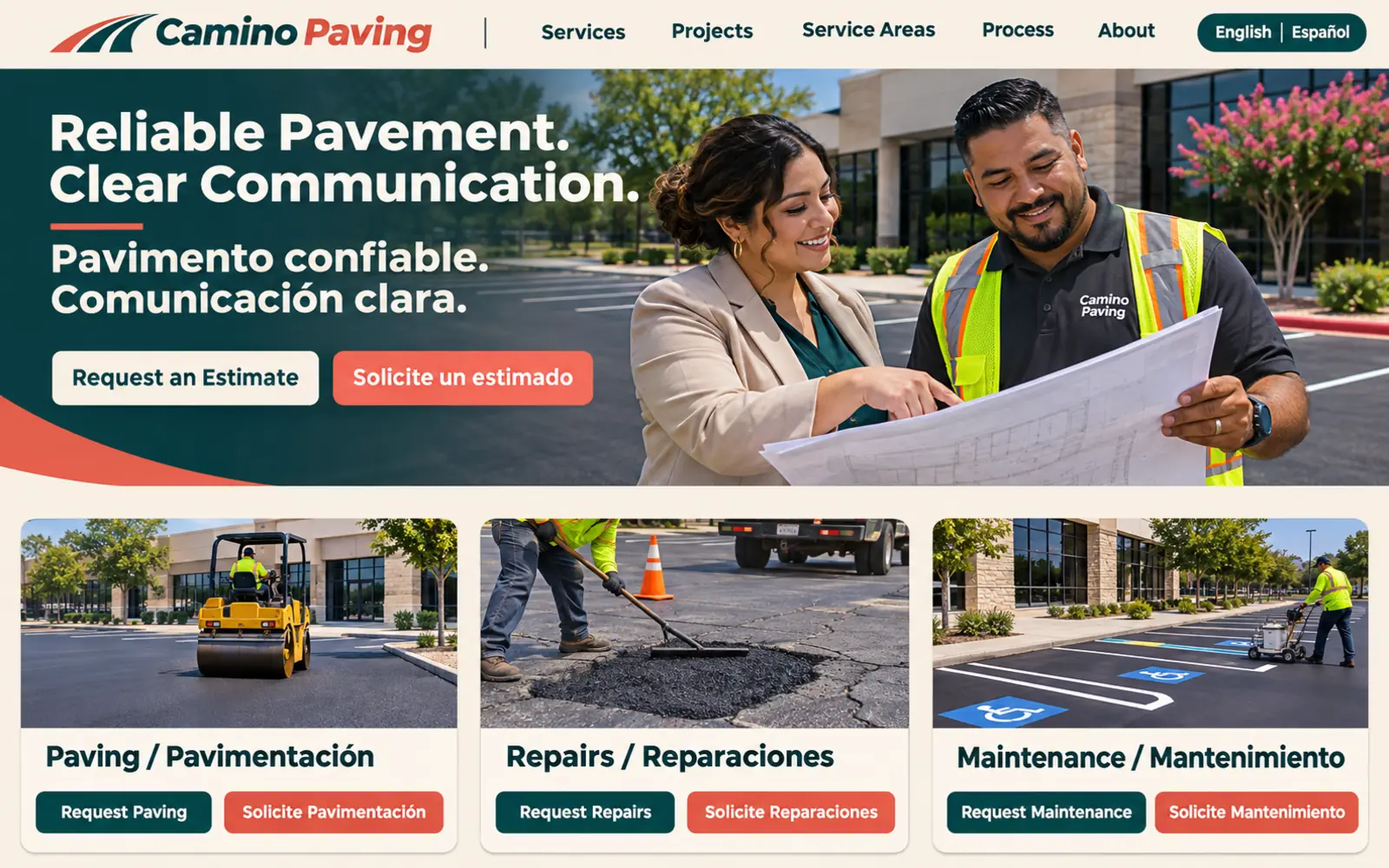
A translated headline does not create a complete bilingual paving experience. This design gives English- and Spanish-speaking visitors equal access to services, project types, service areas, case studies, maintenance information, estimate forms, file-upload instructions, confirmations, appointment details, and follow-up expectations.
Professional translation should account for regional language and technical terms while remaining easy for property owners, procurement teams, field professionals, and homeowners to understand. Navigation, form validation, downloadable materials, automated replies, and scheduling information should remain consistent with the selected language.
The operational experience matters as much as the website. The company needs a dependable way to respond in the customer's preferred language and accurately discuss scope, site conditions, scheduling, access, and next steps. Hispanos Marketing treats bilingual communication as part of a complete multicultural customer journey—not as a decorative translation layer.
Paving company website design checklist
Before launching or redesigning a paving company website, confirm that it supports the way customers define projects, evaluate experience, and request an estimate or bid:
- The hero identifies the primary services, customer types, service region, and next step.
- Commercial, municipal, construction-partner, property-management, and residential paths are distinct when offered.
- Service pages distinguish new paving, repair, preservation, resurfacing, reconstruction, striping, and related work accurately.
- Project case studies include relevant scope, site context, process, phasing, and finished results.
- Service-area pages reflect real coverage and useful local information rather than duplicate city copy.
- Estimate and bid forms collect enough project information while remaining easy to complete on mobile.
- Plans, photos, specifications, and bid documents can be shared securely when needed.
- Maintenance content explains assessment and planning without making unsupported treatment or performance promises.
- Accessibility, striping, safety, licensing, certification, and compliance claims are current and verifiable.
- Authentic photography is used whenever work is presented as the company's completed project.
- English and Spanish journeys are complete when bilingual service is offered.
- Calls, forms, qualified estimates, bid invitations, appointments, and marketing sources are measured.
If the initial cost and upkeep of a traditional website are barriers, explore our managed website plans. They combine a professional website framework with hosting, routine maintenance, and technical support in one monthly plan.
Frequently asked questions about paving company website design
What should a paving company website include?
A paving company website should clearly present the services offered, customer and property types served, geographic coverage, completed projects, estimating process, company information, team or qualifications, safety and coordination practices, reviews, frequently asked questions, and contact options. Commercial contractors may also need bid intake, file uploads, capability information, maintenance planning, procurement resources, and multilingual content.
How can a paving contractor website generate more qualified leads?
It should help visitors identify the relevant service, confirm coverage, review comparable projects, and share useful project details before submitting an inquiry. Focused service pages, local visibility, authentic case studies, guided forms, clear calls to action, accurate tracking, and responsive estimating follow-up work together to turn search traffic into qualified opportunities.
Should a paving company list prices online?
Fixed prices are often difficult to present because site condition, area, access, materials, base work, drainage, traffic control, phasing, mobilization, specifications, and timing may affect the scope. A website can explain the factors considered and offer a clear assessment or estimate process. Publish ranges only when the company can keep them current, qualify them responsibly, and explain what is or is not included.
How should paving project galleries be organized?
Organize projects by service, market, property type, and location where useful. Each case study should include authentic visuals and enough context to understand the original condition, project objectives, scope, process, coordination, and result. Before-and-after sequences are most useful when captions explain what changed instead of relying on appearance alone.
How many pages does a paving company website need?
There is no universal number. A focused local contractor may need core pages for services, markets, projects, company, service area, FAQs, and contact. A larger commercial paving company may need individual pages for each service, industry, local market, project case study, maintenance program, procurement resource, and estimating path. Page count should follow customer decisions and the company's actual capabilities.
How often should a paving company website be updated?
Update services, coverage, estimator contacts, credentials, project galleries, reviews, forms, and team information whenever they change. Seasonal messages, maintenance guidance, local pages, bid resources, integrations, tracking, page speed, accessibility, and older content should also be reviewed routinely. Assign clear ownership so the website reflects the work the company can currently perform.
Build a paving company website around the project decision
The best paving company website is not simply the one with the largest equipment photos. It is the one that helps the right buyer identify a relevant service, confirm coverage, evaluate credible project proof, understand the next step, and submit enough information for a productive response.
Hispanos Marketing designs conversion-focused websites for paving companies, contractors, and professional service businesses in Dallas–Fort Worth and nationwide. We connect positioning, content, user experience, local relevance, and measurement so the website supports real growth. Explore our concrete contractor website design examples, home builder website design examples, electrician website design examples, landscaping website design examples, roofing website design examples, plumbing website design examples, HVAC website design examples, and construction website design examples for additional industry breakdowns, or review our website design service.
Book a call with Hispanos Marketing to discuss the right website structure for your paving company.